
Swaps and schedules
In this tutorial we change a controller while it runs without a jump: one set of virtual elements is blended into another, and a Param follows values over time. Both run in the controller’s own step, so they work the same in a simulation and on a robot.
The blend
A swap replaces the torques \(u_\mathrm{old}\) of the running controller by the torques \(u_\mathrm{new}\) of another, over a duration \(T\):
Both controllers run during the blend. The weight is the quintic that goes from 0 to 1 with zero first and second derivatives at both ends. So the torque and its first two derivatives are continuous at the start and at the end of a swap:
import numpy as np
import matplotlib.pyplot as plt
import virtualmodelcontrol as vmc
from virtualmodelcontrol.control import blend_weight

T = 1.0  # [s]
t = np.linspace(0.0, T, 2001)
s = t / T
w = np.array([blend_weight(x, T) for x in t])
dw = (30 * s**2 - 60 * s**3 + 30 * s**4) / T  # [1/s]
ddw = (60 * s - 180 * s**2 + 120 * s**3) / T**2  # [1/s^2]

fig, axes = plt.subplots(3, 1, figsize=(6.4, 7.2), sharex=True)
labels = ("$w$", r"$\dot w$", r"$\ddot w$")
for ax, y, label in zip(axes, (w, dw, ddw), labels):
    ax.plot(t, y)
    ax.set_ylabel(label)
axes[-1].set_xlabel("time [s]");
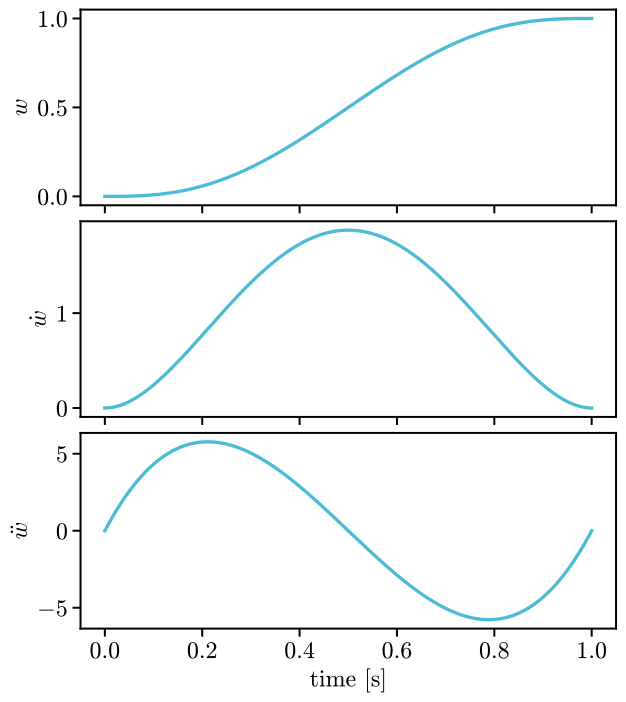
The optimizer of Optimize uses the same blend_weight, so that it plans what the
controller executes.
A swap on the soft arm
The configuration file of Experiments in files, reach.yaml, has a stiff
controller and a gentle one, whose spring never pulls with more than 0.5 N. Download it as
described there, into the folder where you run the code. We run the stiff one towards a goal
and swap to the gentle one at 1 s, first at once and then blended over 1 s:
spec = vmc.config.read("reach.yaml")
del spec["experiment"]["schedule"]  # we swap in code here, not by the file
experiment = vmc.config.load(spec)
stiff, gentle = (experiment.controllers[k] for k in ("ctrl", "gentle"))
stiff.set({"ctrl.reach.goal": [0.08, 0.0, 0.40]})


def run(duration):
    swaps = [(1.0, gentle, duration)]  # at 1 s, to the gentle controller
    swapped = vmc.control.ScheduledController(stiff, swaps=swaps)
    plant = vmc.sim.ModelPlant(experiment.robot)
    return vmc.sim.run(plant, swapped, vmc.sim.SimClock(1 / 330), T=3.0)


hard, soft = run(0.0), run(1.0)
fig, ax = plt.subplots()
for name, log in (("at once", hard), ("blended over 1 s", soft)):
    rows = log.arrays()
    later = rows["t"].ravel() > 0.5  # after the start
    norm = np.linalg.norm(rows["motor_torque"][later], axis=1)
    ax.plot(rows["t"][later], norm, label=name)
ax.set_xlabel("time [s]")
ax.set_ylabel(r"torques [N$\cdot$m]")
ax.legend(loc="upper right", fontsize=18);
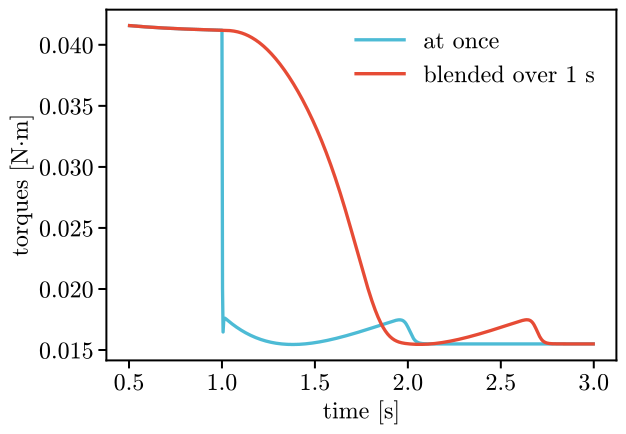
Swapped at once, the torques jump by 0.05 N·m between two control steps, at the swap. Blended, the largest change between two steps after the start is 3.2e-04 N·m.
ScheduledController(controller, schedules, swaps) runs the swaps and the schedules below. Each
swap is a time [s], the controller to swap to and a duration [s]. On its own,
vmc.control.SwapController(controller) swaps when asked: swap(other, duration). A swap asked
for during a blend waits for it to end. Both controllers must be compiled for the same robot.
The controllers’ Params keep their own values, so a Param changed with controller.set stays
changed when you swap away and back.
Schedules
A Schedule holds the values of one live Param (one that can change at any step, see
Parameters) over time, as points: a time [s] from the
start of the run and a value. Between points the value moves in a straight line (linear) or jumps at
each point and holds (step). Before the first point the Param keeps its own value. After the
last point it holds the last value:
from virtualmodelcontrol.control import Schedule

points = [(0.5, 100.0), (1.5, 300.0), (2.5, 200.0)]
linear, step = Schedule("k", points), Schedule("k", points, "step")
time = np.linspace(0.0, 3.0, 601)

fig, ax = plt.subplots()
shown = (("linear", linear, "-"), ("step", step, "--"))
for name, schedule, style in shown:
    values = [schedule.value(x) for x in time]
    values = [np.nan if v is None else v for v in values]  # None: unset
    ax.plot(time, values, style, label=name)
ax.set_xlabel("time [s]")
ax.set_ylabel("stiffness [N/m]")
ax.legend(loc="lower right", fontsize=18);
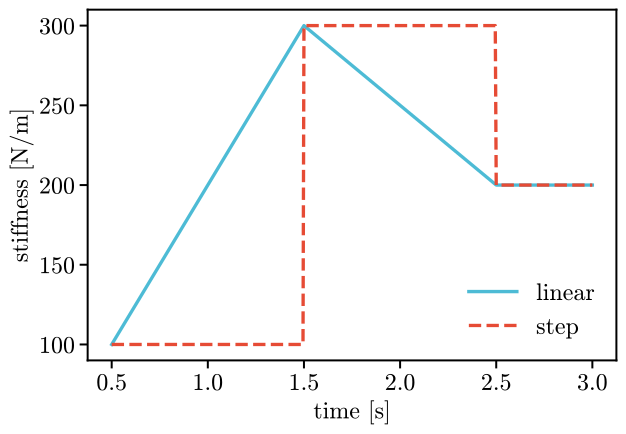
value gives None before the first point, where the schedule leaves the Param alone. A
schedule sets its Param on every controller that has it live, through controller.set. So a
schedule of a Param that is not live fails when the controller is built, not in the middle of
a run. The reset of the ScheduledController starts a run again from the controller’s own
values.
Attached to a controller, a schedule moves its Param as the run goes. Here the stiffness of the spring falls from 300 to 100 N/m between 0.5 s and 1.5 s:
fall = Schedule("ctrl.reach.stiffness", [(0.5, 300.0), (1.5, 100.0)])
scheduled = vmc.control.ScheduledController(stiff, [fall])
plant = vmc.sim.ModelPlant(experiment.robot)
run_log = vmc.sim.run(plant, scheduled, vmc.sim.SimClock(1 / 330), T=2.0)
stiff.live_params()["ctrl.reach.stiffness"]  # where the schedule left it
array(100.)
The same swaps and schedules are the swap and schedule entries of a configuration
(Experiments in files).