
Coordinates
In this tutorial we build coordinates on the soft arm: points, joints, differences, projections, virtual states of the controller, and a cart on a rail. Components says what to attach to them.
Points and joints
A coordinate is a quantity that a component acts on. The simplest ones come from the robot’s model: points of its body and entries of its configuration \(q\).
import numpy as np
import matplotlib.pyplot as plt
import virtualmodelcontrol as vmc
from virtualmodelcontrol.robots import helyx

arm = helyx.arm("145-145-145")
tip = arm.point(s=1.0)  # the tip, 3 entries [m]
middle = arm.point(s=0.5)  # halfway along the arm
segment1 = arm.joint(slice(0, 3))  # the first segment's q, 3 entries [m]
tip, middle, segment1
(FramePoint(s=1.0), FramePoint(s=0.5), Joint([0, 1, 2], unit='m'))
On a continuum robot, s runs from 0 at the base to 1 at the tip, uniformly in rest length (the arc length while no segment stretches).
Rigid robots and hands name their points instead, as in finger.point("tip") or
hand.point("index/tip"). offset= moves the point within that frame.
New coordinates from old ones
Subtracting, projecting, measuring, slicing and stacking coordinates gives new ones, and the library differentiates all of them exactly.
goal = vmc.Ref("goal", value=[0.1, 0.0, 0.40])  # a goal [m]
reach = tip - goal  # where the tip is, minus where it should be
height = vmc.Projection(reach, [0.0, 0.0, 1.0])  # along z only
distance = vmc.Norm(middle - tip)  # [m]
wall = vmc.PlaneDistance(tip, normal=[0, 0, -1], origin=[0, 0, 0.45])
for c in (reach, height, distance, wall, reach[0], vmc.Stack(tip, middle)):
    print(c)
Difference(dim=3, unit='m')
Projection(dim=1, unit='m')
Norm(dim=1, unit='m')
PlaneDistance(dim=1, unit='m')
Slice(dim=1, unit='m')
Stack(dim=6, unit='m')
A projection, a norm and a distance are one number each: a spring on height pulls along \(z\)
only. The constrained elements, such as vmc.ConstrainedLinearSpring(reach, k, normal=n), are
ready-made springs and dampers on such a projection. PlaneDistance and SphereDistance are
signed distances to a surface, for contacts.
A sum works like a difference: tip + [0.0, 0.0, 0.05] is the point 5 cm above the tip. A plain
list works as a goal too, as in tip - [0.1, 0.0, 0.40]. It becomes a live parameter named
ref of the component that uses it (reach.ref for a component reach,
see Parameters). For anything else, vmc.Custom wraps a function
written with CasADi operations (Extend the library).
Virtual states
A controller can have degrees of freedom of its own. add_state creates one. It needs an
inertance, which is a virtual mass. Springs and dampers connect it to the robot. Here a virtual
point follows the tip on a spring:
ctrl = vmc.Mechanism("ctrl")
follower = ctrl.add_state("follower", dim=3, unit="m",
                          initial=[0.0, 0.0, 0.435])  # the tip at rest
ctrl.add("mass", vmc.Inertance(follower, 0.05))  # [kg]
ctrl.add("tether", vmc.LinearSpring(tip - follower, 25.0))  # [N/m]
ctrl.add("drag", vmc.LinearDamper(follower, 0.5))  # [N·s/m]
law = vmc.compile(vmc.VirtualMechanismSystem(arm, ctrl))
law.z0  # the initial state: positions, then velocities
array([0. , 0. , 0.435, 0. , 0. , 0. ])
At every step the controller moves the state by its equations of motion: the inertance gives it a mass, and the tether and the drag push it. The same tether pulls the tip towards the follower, so the tip drags a virtual mass on a spring.
A cart on a rail
A virtual state is only a number. To give it a geometry, take a point of any model at the
state’s value: vmc.FramePoint(model, site, q=state). The model here is a SerialChain with a
rail: a curve in front of the arm, with a cart that runs along it. A spring
ties the arm’s tip to the cart, so the tip is pulled along the curve, wherever the cart goes.
In the model, ("rail", curve) is a joint that slides along the spline through the waypoints
curve, and the site "cart" is the point that rides on it (Joints and bodies
explains these models).
The arm points up here ("290-145-145", 0.58 m long), and the curve is an arc of radius 0.57 m
about its base.
The coordinate q is where the cart is on the rail, and anything can give it: a virtual state
(as above, a free cart that the tip drags along); a vmc.Ref (a cart held where the reference
says, which controller.set moves); or a function of time, built from vmc.Time(). We take
the last, a smooth ramp that starts after 1.5 s and takes 4 s, so the tip follows the curve
slowly:
import casadi as ca
from virtualmodelcontrol.models import SerialChain

arm_up = helyx.add_dynamics(helyx.arm("290-145-145"))  # points up
angle = np.linspace(-0.3, 0.3, 7)  # an arc about the base [rad]
curve = 0.57 * np.column_stack([np.sin(angle), 0 * angle, np.cos(angle)])
rail = SerialChain([("rail", curve)], axes=[None], points=[[0, 0, 0]],
                   sites={"cart": (1, curve[0])})  # at the first point

def ramp(t):  # 0 until 1.5 s, then 0 to 1 smoothly in 4 s
    u = ca.fmin(ca.fmax((t - 1.5) / 4.0, 0.0), 1.0)
    return 3 * u**2 - 2 * u**3

cart = vmc.FramePoint(rail, "cart", q=vmc.Custom(ramp, [vmc.Time()], dim=1))
tip_up = arm_up.point(s=1.0)
follow = vmc.Mechanism("follow")
follow.add("tie", vmc.LinearSpring(tip_up - cart, 600.0))  # [N/m]
follow.add("damp", vmc.LinearDamper(tip_up, 5.0))  # [N·s/m]
follow.add("gravity", vmc.GravityCompensation(arm_up))
system = vmc.VirtualMechanismSystem(arm_up, follow)
controller = vmc.VMCController(vmc.compile(system))

plant = vmc.sim.ModelPlant(arm_up)
log = vmc.sim.run(plant, controller, vmc.sim.SimClock(1 / 330), T=6.5)
rows = log.arrays()
kin = vmc.Kinematics(arm_up)
tip_path = np.array([kin.position(q, 1.0) for q in rows["q"]])
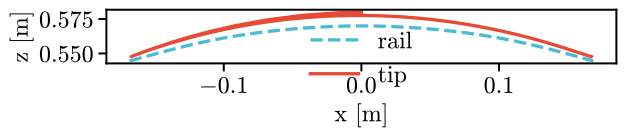
After it has caught up with the cart, the tip stays within 0.8 cm of the
curve. The arm hardly stretches or shortens, so the curve has to stay about as far from the
base as the arm is long. A goal can move in the same way:
vmc.Custom(f, [vmc.Time()], dim=3) is a point that follows \(f(t)\), and a damper on the
tip’s difference to it feels the goal’s velocity.