
Real-time runs
A controller runs the same way on a robot and in a simulation: vmc.sim.run reads the plant,
asks the controller for torques, writes them, and waits for the next step. This page has two
parts: how to connect a robot and run on it, and how to test a controller in simulation first.
Read Part 2 before the first run on a robot.
Part 1: On a robot
Describe the robot and the controller
A real robot needs no dynamics in the library: the robot itself is the plant. The robot’s mechanism holds its kinematics, its motors and the masses that gravity compensation uses. The hardware profile holds the motors’ order, signs and units:
import numpy as np
import matplotlib.pyplot as plt
import virtualmodelcontrol as vmc
from virtualmodelcontrol.robots import helyx

arm = helyx.arm("145-290-290")  # kinematics, tendons, masses
profile = helyx.hardware("145-290-290")  # motor order, signs, units
tip = arm.point(s=1.0)

ctrl = vmc.Mechanism("ctrl")
ctrl.add("reach", vmc.LinearSpring(tip - [0.05, 0.0, 0.70], 100.0))
ctrl.add("damp", vmc.LinearDamper(tip, 2.0))
ctrl.add("gravity", vmc.GravityCompensation(arm))
system = vmc.VirtualMechanismSystem(arm, ctrl)
controller = vmc.VMCController(vmc.compile(system))
Wrap your driver in a plant
The library does not talk to motors. A plant is a small object between the library and your
driver (a thread that keeps the last readings, a serial port, anything). It has three members: t, the
time now [s]; read(), which returns motor_position [rad] and motor_velocity [rad/s] with
the time of the reading; and write(cmd), which sends cmd["motor_torque"] [N·m]. The profile
does the unit conversions:
class Plant:
    def __init__(self, driver):
        self.driver = driver

    t = property(lambda self: self.driver.time())

    def read(self):
        deg, deg_s = self.driver.read()  # from the start pose
        return vmc.Signals(
            self.t,
            motor_position=profile.angles_from_degrees(deg),
            motor_velocity=profile.angles_from_degrees(deg_s),
        )

    def write(self, cmd):
        self.driver.write(profile.bus_torques(cmd["motor_torque"]))

    def close(self):
        self.driver.write(np.zeros(9))  # no torque when we stop
driver is yours. So that this page runs without a robot, a simulated arm stands in for it and
answers like the motors:
class Driver:
    """Stands in for your driver: a simulated arm, in degrees."""

    def __init__(self):
        arm = helyx.add_dynamics(helyx.arm("145-290-290"))
        self.sim = vmc.sim.ModelPlant(arm)

    def time(self):  # [s]
        return self.sim.t

    def read(self):
        meas = self.sim.read()
        return (profile.degrees(meas["motor_position"]),
                profile.degrees(meas["motor_velocity"]))

    def write(self, torques):  # this profile's conversion undoes itself
        tau = profile.bus_torques(torques)
        self.sim.write(vmc.Signals(self.time(), motor_torque=tau))
Run
WallClock runs the loop on the computer’s clock. On the robot, it is:
clock = vmc.sim.WallClock(dt=1 / 330, stale=0.05)  # [s]
# `driver` is your own object, as in the Plant above
log = vmc.sim.run(Plant(driver), controller, clock, T=10.0)
T=None runs until Ctrl-C.
Here the clock takes its now and sleep from the stand-in, so nothing waits for real:
driver = Driver()
clock = vmc.sim.WallClock(1 / 330, 0.05, now=driver.time,
                          sleep=driver.sim.advance)
log = vmc.sim.run(Plant(driver), controller, clock, T=1.0)
log.info
{'steps': 330,
 'rate': 329.99999999999847,
 'dt_max': 0.003030303030303383,
 'overruns': 0,
 'stale': 0,
 'guard_trips': 0}
The loop also checks every reading. The controller gets the time it really is, not a nominal
\(k\,\Delta t\), so its virtual states integrate over the measured step. The run took
330 steps per second, as asked. log holds the signals and dt, the measured
length of each step. log.info counts the overruns (steps longer than the period), the
stale readings the loop refused as too old and the guard_trips (readings missing or not
numbers). A refused reading means zero torque for that step.
A run that goes on for hours would keep every step in memory. With window [s], run keeps
only the last seconds of the log (up to a quarter more, until it trims), and log.info["steps"]
still counts every step. log.crop(t_min, t_max) takes a part of any log:
driver = Driver()
clock = vmc.sim.WallClock(1 / 330, 0.05, now=driver.time,
                          sleep=driver.sim.advance)
long = vmc.sim.run(Plant(driver), controller, clock, T=3.0, window=1.0)
kept = long.arrays()["t"].ravel()
last = long.crop(t_min=kept[-1] - 0.5)  # the last half second
len(kept), len(last.arrays()["t"])
(334, 166)
The log holds 334 of the 990 steps, the last second or so, and nothing older.
run does not close the plant: do it yourself, with try and finally:
plant = Plant(driver)
try:
    log = vmc.sim.run(plant, controller, clock, T=10.0)
finally:
    plant.close()  # a real plant stops its motors
Your own loop
If your robot already has a loop that talks to its driver, skip run and call the controller in it:
controller.reset(plant.t, plant.read())
while running:
    meas = plant.read()
    plant.write(controller.step(plant.t, meas))
Before the first run
Nothing touches a real robot without its owner’s go-ahead. Check, in order:
The same controller in simulation first (Part 2): same file, same rate; look at the torques and the energies (Run logs).
Signs and units. Move the robot by hand with the torque off and watch
motor_positionandmotor_velocitychange as the model says.A run that writes nothing. Make
writedo nothing and look atlog.info: the readings should be fresh and the rate should hold.Low gains, then more. A small stiffness, a damping that holds, a goal close to where the robot is. Change gains live with
controller.set, never by editing the file mid-run.Limits. Joint-limit springs, an output stage with a
TorqueLimitfor the first runs, a goal inside the workspace. No torque limit applies unless you ask for one:vmc.VMCController(compiled, [vmc.control.output.TorqueLimit(0.5)])clips every command to ±0.5 N·m.Stale and missing data. Set
staleto a few periods, and readstaleandguard_tripsat the end of every run.A way out. Your driver stops the motors when the loop stops writing (a watchdog) and on exit, and someone is within reach of the power switch. The last torque stays on the motors until something changes it.
The first step. The controller starts from the robot’s current state; its first torques should be small, before you raise the gains.
Part 2: In simulation
This part continues Part 1: it uses the arm, system and controller that Part 1 built.
The same controller on a simulated arm
For a simulation the arm also needs its own stiffness, damping and gravity, which
helyx.add_dynamics adds. ModelPlant is the plant that integrates them, and SimClock steps
simulated time:
helyx.add_dynamics(arm)  # adds them to this arm, and returns it
plant = vmc.sim.ModelPlant(arm)
sim = vmc.sim.run(plant, controller, vmc.sim.SimClock(1 / 330), T=3.0)
sim.arrays()["motor_torque"].shape
(990, 9)
Nothing else changes: the same controller and the same run. The simulation is the place to
choose gains and to read the energies (Parameters, Energy).
A faster simulation
vmc.sim.rollout simulates the same closed loop in one compiled call, without the plant and the
loop in Python. Its rows are those of run:
r = vmc.sim.rollout(system, np.zeros(9), T=3.0, dt=1 / 330)
float(np.abs(r["q"] - sim.arrays()["q"]).max())  # [m]
1.2853216754815655e-16
The integrator argument of rollout chooses how the robot is integrated between control
steps: "implicit" (the default, stable for stiff robots such as the soft arm), "rk4" for
robots that are not stiff, and "cvodes" (CasADi’s integrator) when accuracy matters more than
speed. The p argument takes a CasADi symbol for the controller’s live Params, so that the
result can be differentiated with respect to them. For SciPy, vmc.sim.ode(system) is the
closed loop in continuous time: a function f(t, x) for solve_ivp:
from scipy.integrate import solve_ivp

f = vmc.sim.ode(system)
sol = solve_ivp(f, (0.0, 1.0), np.zeros(18), method="Radau")
float(np.abs(sol.y[:9, -1] - r["q"][330]).max())  # [m]
9.687168762615404e-08
The rollout differs from run by 1e-16 m, rounding error. The continuous-time
solution differs from the sampled loop by 1e-07 m after a second, the effect of
sampling the controller at 330 Hz.
The real-time loop under faults
The loop also has to survive a robot that is late or silent. To see how, we run it on a simulated arm with faults to switch on. A fake clock makes every run repeat:
dt = 1 / 330  # [s]


class Faulty:
    """The simulated arm on the clock's time, with faults to switch on."""

    def __init__(self, lag=0.0, blind=(1.0, 0.0)):
        self.sim = vmc.sim.ModelPlant(arm)
        self.lag, self.blind = lag, blind

    t = property(lambda self: self.sim.t)

    def read(self):
        meas = self.sim.read()
        meas.t -= self.lag  # an old reading
        if self.blind[0] <= self.t < self.blind[1]:  # no velocity reading
            meas.set("motor_velocity", np.full(9, np.nan))
        return meas

    def write(self, cmd):
        self.sim.write(cmd)


class Slow:
    """The controller, some of whose steps take long (a busy computer)."""

    def __init__(self, plant, slow=()):
        self.plant, self.slow, self.steps = plant, slow, 0
        self.controller = vmc.VMCController(vmc.compile(system))

    def reset(self, t, meas=None, z0=None):
        self.controller.reset(t, meas, z0)

    def step(self, t, meas):
        self.steps += 1
        if self.steps in self.slow:
            self.plant.sim.advance(0.02)  # [s]
        return self.controller.step(t, meas)


def go(plant, ctrl, T=0.5, stale=0.05):
    clock = vmc.sim.WallClock(dt, stale, now=lambda: plant.t,
                              sleep=plant.sim.advance)
    return vmc.sim.run(plant, ctrl, clock, T)
A late step. Three steps take 20 ms instead of 3 ms. The loop does not hurry the next steps to catch up: that would give the controller a burst of steps shorter than the period. It starts again from the moment the late step ended, counts it, and warns once at the end:
import warnings

plant = Faulty()
ok = go(plant, Slow(plant))
with warnings.catch_warnings(record=True) as caught:
    warnings.simplefilter("always")
    plant = Faulty()
    late = go(plant, Slow(plant, slow=(40, 80, 120)))
str(caught[0].message), late.info["overruns"]
('3 of 165 steps took longer than 3.0 ms (slowest 20.0 ms)', 3)
fig, ax = plt.subplots()
for name, result, style in (("three late steps", late, "-"),
                            ("healthy", ok, "--")):
    ax.plot(1000 * result.arrays()["dt"][1:], style, label=name)
ax.set_xlabel("step")
ax.set_ylabel("step length [ms]")
ax.legend(loc="lower center", bbox_to_anchor=(0.5, 1.0), ncol=2,
          fontsize=18);
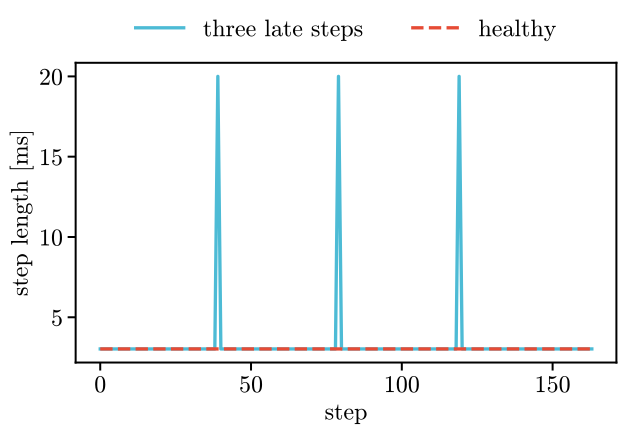
The late steps last 20 ms against 3.0 ms, and no step is shorter than the period.
An old reading. Over a network or a serial line, a reading can arrive late. With stale=0.05 the
loop refuses a reading more than 50 ms older than the plant’s clock and sends zero torque. Here
every reading is 80 ms old:
plant = Faulty(lag=0.08)
old = go(plant, Slow(plant), T=0.2)
old.info["stale"], bool(old.arrays()["motor_torque"].any())
(66, False)
The first number counts the readings refused as stale, one per step here. The second is False:
not one torque was sent.
A missing reading. A reading that is missing or not a finite number trips the guard: zero torque, and the trip is counted. Here the velocities are NaN between 0.2 s and 0.3 s:
plant = Faulty(blind=(0.2, 0.3))
blind = go(plant, Slow(plant))
rows = blind.arrays()
silent = (rows["t"] > 0.2) & (rows["t"] < 0.3)
blind.info["guard_trips"], bool(rows["motor_torque"][silent.ravel()].any())
(32, False)
The first number counts the trips of the guard, about one per step of the 0.1 s without
velocities. The second is False: the torque was zero all through the silence.
Ctrl-C. It ends a real-time run with the log so far. The step that is running finishes first (an interrupt in the middle of a step could land inside a call into CasADi or numpy and lose the log), and a second Ctrl-C stops the run at once, for one that is stuck. A signal handler of your own is left alone. Here the controller raises it at its 60th step:
class Stop(Slow):
    def step(self, t, meas):
        if self.steps == 60:
            raise KeyboardInterrupt
        return super().step(t, meas)


plant = Faulty()
len(go(plant, Stop(plant), T=None).arrays()["t"])
60