
How the library is organized
This page is a map: what each part of the library does, and which names to look for. The library is a stack of layers. Each layer uses only the layers below it. The ready-made robots and the figures sit at the edges. They may use every layer, and no layer uses them.
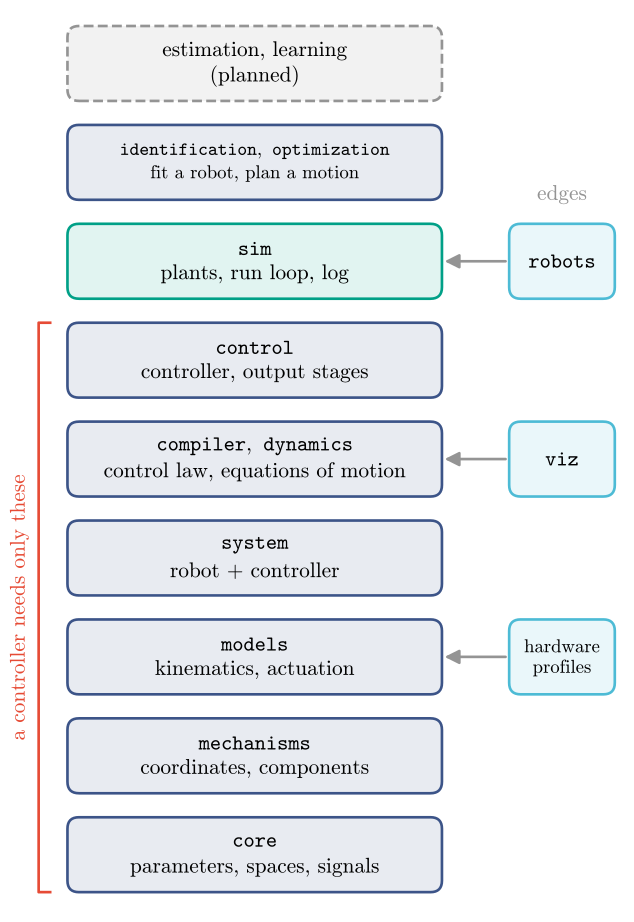
From the bottom, the layers are core (Params and signals), math, mechanisms, models,
system, compiler and dynamics, control, sim, estimation and identification, and
adaptation and optimization. The edges are robots, hardware, viz, config and testing.
A controller needs only the layers up to control: describe the robot with models, place
virtual elements with mechanisms, pair them in a VirtualMechanismSystem, compile it and
run it with VMCController. Simulation, figures and the robot templates are optional.
The order is checked automatically on every change, and so is that nothing in the library imports
a robot middleware such as ROS: signals come in and go out as arrays.
Where things are
You want to |
Use |
|---|---|
start from an existing robot |
|
describe a new robot |
|
place virtual elements |
|
compile and run a controller |
|
correct commands for real hardware |
|
get positions, Jacobians, Hessians |
|
get the robot’s equations of motion |
|
simulate a closed loop |
|
estimate the state, forces and stiffness |
|
change a running controller’s Params to track a goal |
|
fit stiffness, damping and efficiencies to data |
|
plan a motion and optimize a controller’s Params |
|
record, save, replay and compare runs |
|
describe an experiment in a file |
|
draw and animate |
|
run a model without CasADi |
|
parameters, units, scopes |
|
One symbolic source
Every model is written once with CasADi operations. Jacobians, Hessians, the control law and the robot’s dynamics all come from that one graph by automatic differentiation, so they cannot disagree. The robot’s dynamics take one form for every robot, the residual
with \(M\) the mass matrix, \(h\) the velocity terms of the kinetic energy (Coriolis and centrifugal), \(B\) the actuation map, \(f_k\) the forces of the robot’s own components (springs, dampers, gravity) and \(J_k\) the Jacobian of each one’s coordinate with respect to the velocity. A model whose dynamics are not made of such components (a black box) gives the residual itself, as a function. The numpy and PyTorch versions of a model are not written again: they are generated from the same graph (Use a model outside CasADi).
To use these parts, start with your first controller.