Your first controller
In this tutorial we build a controller for the soft arm and compute the torques it sends at one control step. Then we run it on a simulated arm, plot the run and animate it. Install the library first, and see Run the examples for where to type the code.
The robot
helyx.arm builds the soft arm of the soft-arm example: its
kinematics, its nine tendon motors (three tendons on each of its three segments) and the masses of its segments. A simulator also needs the
arm’s own stiffness and damping, and gravity. helyx.add_dynamics adds them.
The string "145-145-145" names the geometry: the rest lengths of the three segments in
millimeters. It is one of three: "145-145-145", "145-290-290" and "290-145-145". For other lengths
give them in meters, as in helyx.arm(lengths=[0.10, 0.20, 0.20]). This arm is mounted on its side, with gravity along \(-y\); "145-290-290" hangs
from its base and "290-145-145" points up.
import numpy as np
import matplotlib.pyplot as plt
import virtualmodelcontrol as vmc
from virtualmodelcontrol.robots import helyx

arm = helyx.add_dynamics(helyx.arm("145-145-145"))
list(arm.components)
['m1', 'm2', 'm3', 'stiffness', 'damping', 'gravity']
m1 to m3 are the masses of the three segments, lumped at their middles. The other three
components are the arm’s stiffness, its damping and gravity.
A controller
A spring pulls the tip to a goal, a damper slows the tip down, and gravity compensation cancels the weight of the segments.
goal = np.array([0.08, 0.0, 0.40])  # [m]

ctrl = vmc.Mechanism("ctrl")
ctrl.add("reach", vmc.LinearSpring(arm.point(s=1.0) - goal, 300.0))  # [N/m]
ctrl.add("damp", vmc.LinearDamper(arm.point(s=1.0), 5.0))  # [N·s/m]
ctrl.add("gravity", vmc.GravityCompensation(arm))

system = vmc.VirtualMechanismSystem(arm, ctrl)  # robot and controller
controller = vmc.VMCController(vmc.compile(system))
arm.point(s=1.0) is the point at arc fraction s along the arm: 0 is its base and 1 is its tip.
VirtualMechanismSystem pairs the two mechanisms, and compile turns the controller’s
elements into one CasADi function of the motor angles and rates.
One control step
At every step the controller takes the time, the measured motor angles and the rates, and returns the motor torques. Here the arm is at rest and straight, so the torques are those of the spring pulling it towards the goal and of the gravity compensation holding up its weight:
meas = vmc.Signals(0.0, motor_position=np.zeros(9),
                   motor_velocity=np.zeros(9))
controller.step(0.0, meas)["motor_torque"].round(3)  # [N·m]
array([ 0.591, -0.269, -0.29 ,  0.188, -0.338,  0.181, -0.09 ,  0.01 ,
        0.111])
Signals stamps the measurement with its time, and step takes the time of the step: in a loop
they are the same instant.
A positive torque pulls its tendon, and a negative one lets it out, so some of the nine torques are negative: the tendons on one side pull and those on the other side give way. On the real arm, this call runs at the control rate with the measured angles. The next sections let a simulator provide them.
The loop
A controller never talks to a robot directly. At every control step the run loop reads the measurements from a plant, asks the controller for motor torques, writes them back, and lets the plant move on by one control period. The plant is a simulator or the real robot. The loop and the controller are the same for both.
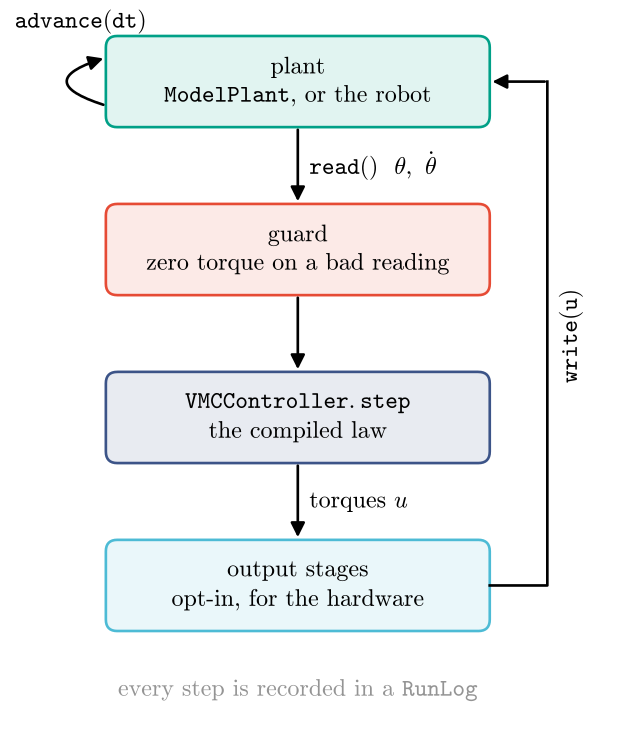
The guard sends zero torque whenever a measurement is missing or not a finite number. Output stages are optional corrections for real hardware, such as friction compensation or a torque limit. A simulation does not need them.
Run
ModelPlant simulates the arm from the robot mechanism alone. run repeats the loop at
330 Hz for two seconds and returns a log of every step.
plant = vmc.sim.ModelPlant(arm)
log = vmc.sim.run(plant, controller, vmc.sim.SimClock(dt=1 / 330), T=2.0)
rows = log.arrays()
sorted(rows)
['law_torque',
 'motor_position',
 'motor_torque',
 'motor_velocity',
 'q',
 't',
 'v']
Each entry is an array with one row per step: the time t, the measured motor angles and rates,
the configuration q and velocity v of the arm, the torques sent to the motors
(motor_torque) and the torques the controller asked for before any output stage
(law_torque). Run logs shows what else a run records, and how to save and
replay it.
Plot
We follow the tip through the run and look at the torques the controller sent.
kin = vmc.Kinematics(arm)
tip = np.array([kin.position(q, 1.0) for q in rows["q"]])

fig, (top, bottom) = plt.subplots(2, 1, figsize=(6.4, 6.4), sharex=True)
top.plot(rows["t"], 100 * np.linalg.norm(tip - goal, axis=1))
top.set_ylabel("tip to goal [cm]")
bottom.plot(rows["t"], rows["motor_torque"])
bottom.set_xlabel("time [s]")
bottom.set_ylabel(r"torques [N$\cdot$m]");
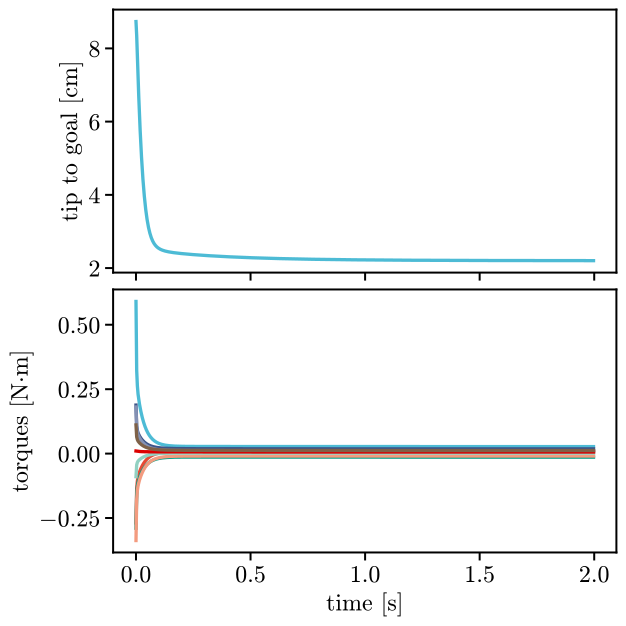
The tip starts 8.7 cm from the goal. It covers nine tenths of its way in the first 67 ms and settles within about 0.6 s, without overshooting. It stops 2.2 cm short of the goal: gravity compensation cancels the arm’s weight, but the arm’s own stiffness holds it back against the virtual spring. A stiffer virtual spring would bring it closer. The torques peak as the spring first pulls, then settle to the small values that hold the arm in place.
Animate
viz.animate draws the run frame by frame and saves it as a video. springs draws the virtual
spring from the tip to the goal, and trace the path of the tip. The arm lies on its side, so
the drawing shows it from above.
from virtualmodelcontrol import viz

viz.animate(arm, log, "first-controller.mp4", springs=[(1.0, goal)],
            trace=1.0)
The same call writes a GIF or an animated WebP if the file name ends in .gif or .webp.
Where to go next
Coordinates and Components list what a controller can be made of, and Parameters shows which of its numbers can change while the arm runs. To write a run to a file and replay it, see Run logs.