
Turtle: two cranks and a virtual flywheel
In this example we keep the two cranks of a crawling turtle in step with a virtual flywheel, and simulate the cranks following it.
The robot
The turtle crawls on two cranks, left and right, each turned by its own motor. A third motor
sets the angle of a variable-stiffness actuator (VSA). It is position-controlled and not part
of this controller. turtle.robot() holds only the two crank angles \(q\) = (left, right)
[rad]: it has no geometry and no masses.
The controller adds a virtual flywheel, a degree of freedom of the controller with its own inertia. A spring and a damper tie each crank to it: the left crank to the flywheel’s angle \(\varphi\), the right crank to \(\varphi - \delta\). A speed regulator drives the flywheel towards a commanded speed \(\bar\omega\), and a constant bias torque acts on both cranks.
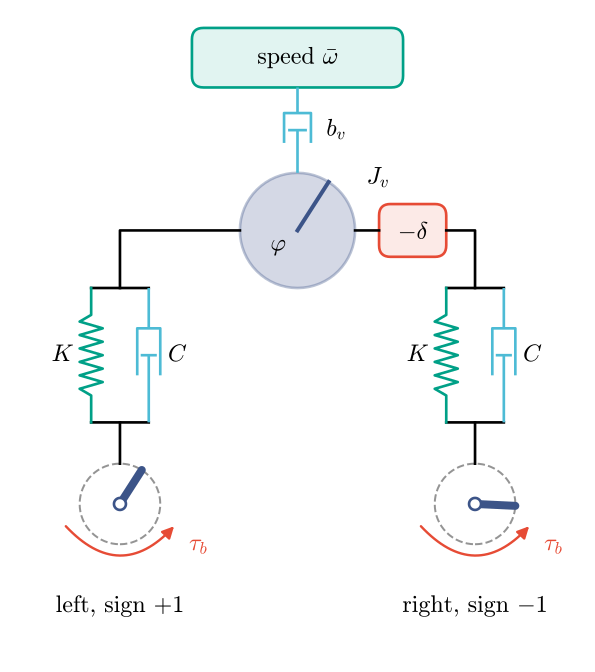
The crank angles follow the gait convention, in which both cranks turn forward at positive
angles. The right motor is mounted mirrored, so its sign is −1: multiply the raw readings and
the commands by turtle.MOTOR_SIGNS (see conventions).
turtle.controller takes the controller’s parameters as keyword arguments. Their defaults are
starting values, not tuned:
Keyword |
Default |
Unit |
Meaning |
|---|---|---|---|
|
1 |
N·m/rad |
\(K\), the spring from each crank to the flywheel |
|
0.0001 |
N·m·s/rad |
\(C\), the damper beside each spring |
|
0.1 |
kg·m² |
\(J_v\), inertia of the flywheel |
|
0.1 |
N·m·s/rad |
\(b_v\), gain of the speed regulator |
|
0.1 |
rad/s |
\(\bar\omega\), the speed it drives the flywheel to |
|
0 |
rad |
\(\delta\), how far the right crank runs behind |
|
3 |
s |
time to ramp \(\bar\omega\) up from zero |
|
0 |
N·m |
\(\tau_b\), a constant torque on both cranks |
Simulate the cranks
The template has no dynamics, so we give the cranks an inertia and a viscous friction with two
library components. Their values are illustrative. They belong to the robot mechanism, which
ModelPlant simulates, while compile uses the controller’s components only. We ask for a
faster speed than the default, with the cranks half a turn apart.
import numpy as np
import matplotlib.pyplot as plt
import virtualmodelcontrol as vmc
from virtualmodelcontrol import viz
from virtualmodelcontrol.robots import turtle

robot = turtle.robot()
cranks = robot.joint([0, 1])
robot.add("inertia", vmc.Inertance(cranks, 1e-3))  # [kg·m²]
robot.add("friction", vmc.LinearDamper(cranks, 1e-2))  # [N·m·s/rad]

ctrl = turtle.controller(robot, speed=2.0, phase=np.pi, ramp_time=1.0)
system = vmc.VirtualMechanismSystem(robot, ctrl)
controller = vmc.VMCController(vmc.compile(system))
plant = vmc.sim.ModelPlant(robot)
z0 = turtle.initial_state(plant.read())
clock = vmc.sim.SimClock(dt=1 / turtle.CONTROL_RATE)
log = vmc.sim.run(plant, controller, clock, T=8.0, z0=z0)
initial_state starts the flywheel at the left crank’s angle, at rest. The log holds the
flywheel’s angle and speed as z, next to the crank angles q:
rows = log.arrays()
t, q, z = rows["t"].ravel(), rows["q"], rows["z"]

fig, (top, bottom) = plt.subplots(2, 1, figsize=(6.4, 6.4), sharex=True)
top.plot(t, q[:, 0], label="left crank")
top.plot(t, q[:, 1], label="right crank")
top.plot(t, z[:, 0], "--", label="flywheel")
top.set_ylabel("angle [rad]")
top.legend()
bottom.plot(t, q[:, 0] - q[:, 1], label="left minus right")
bottom.axhline(np.pi, color=viz.PALETTE[9], ls="--", label="commanded")
bottom.set_xlabel("time [s]")
bottom.set_ylabel("phase [rad]")
bottom.legend();
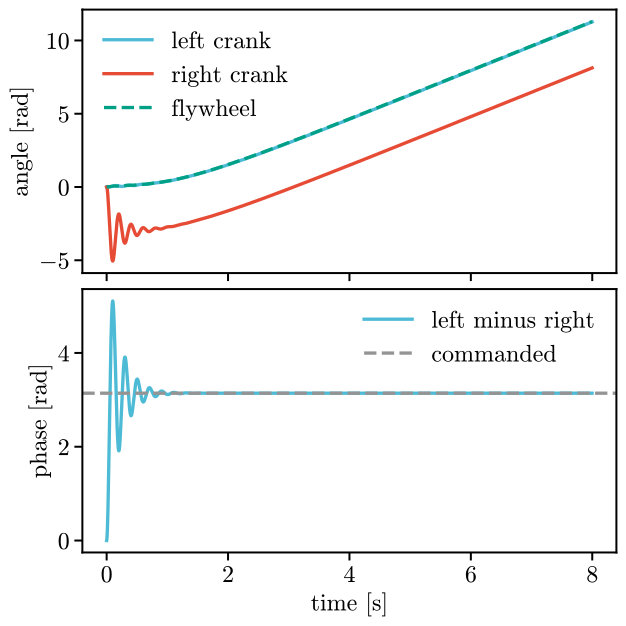
The cranks start together. The right crank’s spring pulls it back by half a turn. It overshoots, swings and settles after about 0.8 s, half a turn behind the left one from then on. The flywheel spins up over the ramp, and the left crank follows it so closely that their lines overlap. The flywheel settles at 1.67 rad/s, not 2: the cranks’ friction \(c\) loads it through the springs, and \(b_v(\bar\omega - \omega) = 2c\,\omega\) gives 1.67 rad/s.
Animate
The robot has no geometry, so animate cannot draw it alone. The draw callback draws the
cranks as bars and the flywheel as a disc with a mark, from each row of the log. limits sets
the view.
def bar(ax, x, angle, **style):
    ax.plot([x, x + 0.6 * np.cos(angle)], [0, 0.6 * np.sin(angle)],
            solid_capstyle="round", **style)

def draw(ax, row):
    ax.set_axis_off()
    for x, angle, name in zip((-1.6, 1.6), row["q"], turtle.CRANKS):
        ax.add_patch(plt.Circle((x, 0), 0.6, fill=False, ec="0.7", ls="--"))
        bar(ax, x, angle, color=viz.PALETTE[3], lw=6)
        ax.text(x, -0.8, name, ha="center", va="top")
    ax.add_patch(plt.Circle((0, 0), 0.6, color=viz.PALETTE[5], alpha=0.35))
    bar(ax, 0.0, row["z"][0], color=viz.PALETTE[3], lw=3)
    ax.text(0, -0.8, "flywheel", ha="center", va="top")

viz.animate(robot, log, "turtle.mp4", draw=draw,
            limits=((-2.3, 2.3), (-1.1, 0.7)), figsize=(6.4, 3.2))
To see the turtle’s cranks crawl in simulation, with a body on the ground, see Crawl with a flywheel.