
Experiments in files
In this tutorial we write an experiment on the soft arm as a YAML file, run it, let its goal and its controller change on a schedule, and save it back with a new stiffness.
The file
A configuration file describes an experiment in a few sections. robot names a robot template
and its arguments. coordinates names coordinates that the controllers share. controller
lists the virtual elements: each names its registered type, the coordinate it acts on and
its gains. This one is like the controller of your first controller, with
another goal:
# The soft arm on its side: a spring walks its tip through two goals,
# then a gentler spring, never pulling more than 0.5 N, takes over.
robot:
  template: helyx.arm
  geometry: "145-145-145"
coordinates:
  tip: {point: {s: 1.0}}
controller:
  elements:
    reach:
      type: linear_spring
      coordinate:
        difference: [tip, {ref: {name: goal, value: [0.0, 0.0, 0.435]}}]
      stiffness: 300.0
    damp: {type: linear_damper, coordinate: tip, damping: 5.0}
    gravity: {type: gravity_compensation}
A coordinate is a name from coordinates, or a mapping of one kind to its arguments, written as
in Python, for instance point ({s: 1.0}, a site’s name, or {at, s, offset}), joint (an index, a list,
or {start, stop}), ref (a live reference with its name and value), difference,
projection ({of, direction}), norm, slice ({of, index}), stack, plane_distance,
sphere_distance and state (the full list is at the end of this page). A plain list in a difference is a live reference named ref,
as tip - [0.1, 0.0, 0.40] is in Python.
Run it
The file is reach.yaml: download it into the folder where you run the code.
In the file the sections come in this order: robot, coordinates, controller, swaps and
experiment. This page shows experiment before swaps, so keep the file’s order if you type
it. vmc.config.load reads the file and builds the robot from its template, the controllers and
the plant. run runs the experiment from its start and returns the log. With run settings in
the file, it also saves the log, as Run logs shows:
import numpy as np
import matplotlib.pyplot as plt
import virtualmodelcontrol as vmc

experiment = vmc.config.load("reach.yaml")
rows = experiment.run().arrays()
sorted(rows)
['law_torque',
 'motor_position',
 'motor_torque',
 'motor_velocity',
 'q',
 't',
 'v']
experiment.robot, experiment.mechanism and experiment.controller are the objects the file
describes, the same ones your first controller builds in Python. So the
other tutorials apply to them unchanged.
Change values on a schedule
The experiment section says how to run it: the plant (here a simulation with the arm’s own
stiffness, damping and gravity from helyx.add_dynamics), the control rate [Hz], the duration
[s] and a schedule. An output list adds output stages to the controller, such as the real
arm’s pretension {type: helyx.output_stage}. This file has none:
experiment:
  plant:
    type: simulation
    dynamics: helyx.add_dynamics
  rate: 330
  duration: 6.0
  schedule:
    - param: ctrl.reach.goal
      points:
        - [0.5, [0.0, 0.0, 0.435]]
        - [1.5, [0.10, 0.0, 0.40]]
        - [3.0, [-0.10, 0.0, 0.40]]
    - {swap: gentle, at: 4.0, duration: 1.0}
A schedule entry moves one live Param through its points: pairs of a time [s] from the start
and a value. The Param is named as in controller.set (Parameters): the mechanism, the
element and the Param, so ctrl.reach.goal is the goal of the element reach of the
controller section (a swap’s mechanism is named by its key, as gentle). Between
points the value moves in a straight line, or jumps with interpolation: step. Before the first
point the Param keeps its own value, and after the last it holds the last one. Here the goal
waits half a second, then walks to one side and to the other.
A swap entry blends to another controller over its duration, with the quintic blend of
vmc.control.SwapController. swaps lists the controllers to swap to, each named by its key and
with the same elements as controller:
swaps:
  gentle:
    elements:
      reach:
        type: tanh_spring
        coordinate: {difference: [tip, [0.0, 0.0, 0.40]]}
        stiffness: 300.0
        max_force: 0.5
      damp: {type: linear_damper, coordinate: tip, damping: 5.0}
      gravity: {type: gravity_compensation}
The gentle controller’s spring pulls the tip towards the middle with a force of at most 0.5 N on each axis. We follow the tip and the goal along \(x\) and \(z\):
from virtualmodelcontrol.control import Schedule

kin = vmc.Kinematics(experiment.robot)
tip = np.array([kin.position(q, 1.0) for q in rows["q"]])
t = rows["t"].ravel()
walk, swap = experiment.spec["experiment"]["schedule"]
path = Schedule("goal", walk["points"])
start = np.array([0.0, 0.0, 0.435])  # [m], the goal before the walk
middle = np.array([0.0, 0.0, 0.40])  # [m], the gentle spring's goal


def goal_at(time):  # [m], the goal pulling the tip at a time [s]
    if time >= swap["at"]:
        return middle
    return path.value(time) if time >= walk["points"][0][0] else start


goal = np.array([goal_at(x) for x in t])
walking = (t >= walk["points"][0][0]) & (t < swap["at"])

fig, axes = plt.subplots(2, 1, figsize=(6.4, 6.4), sharex=True)
for ax, k, axis in zip(axes, (0, 2), "xz"):
    ax.axvspan(swap["at"], swap["at"] + swap["duration"], color="0.9")
    ax.plot(t, 100 * goal[:, k], label="goal")
    ax.plot(t, 100 * tip[:, k], "--", label="tip")
    ax.set_ylabel(f"${axis}$ [cm]")
axes[0].legend(loc="upper right", fontsize=18)
axes[1].set_xlabel("time [s]");
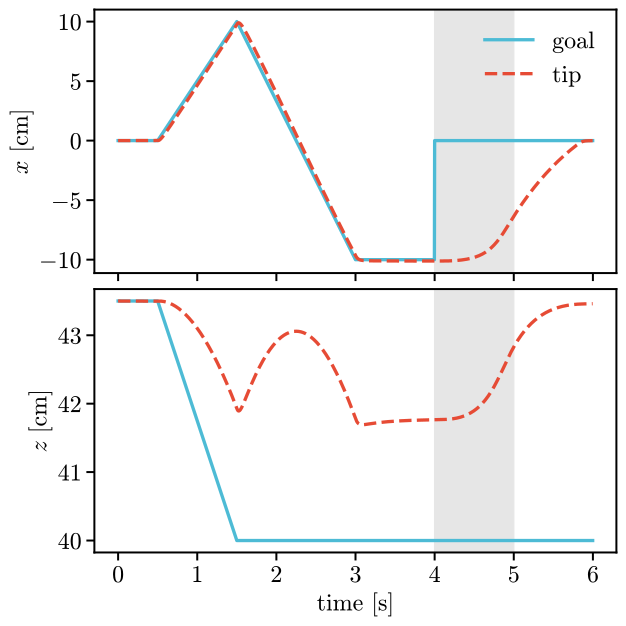
The tip follows the walking goal within 0.7 cm along \(x\). Along \(z\) it stays above the goal, held by the arm’s own stiffness, as in your first controller. From 4 s the gentle controller takes over within a second. Its spring brings the tip back to the middle along \(x\), but with 0.5 N it cannot shorten the arm: the tip ends 3.5 cm above its goal.
from virtualmodelcontrol import viz

def draw(ax, row):
    viz.draw_goal(ax, goal_at(row["t"]))

viz.animate(experiment.robot, rows, "configurations.mp4", draw=draw,
            trace=1.0)
Save it back
save writes the configuration with the current values of the controllers’ Params, so a value
changed in Python reaches the file. Here the spring gets twice the stiffness:
experiment.mechanism.components["reach"].stiffness.value = 600.0  # [N/m]
experiment.save("reach-stiffer.yaml")
stiffer = vmc.config.load("reach-stiffer.yaml")
stiffer.spec["controller"]["elements"]["reach"]
{'type': 'linear_spring',
 'coordinate': {'difference': ['tip',
   {'ref': {'name': 'goal', 'value': [0.0, 0.0, 0.435]}}]},
 'stiffness': 600.0}
tip = np.array([kin.position(q, 1.0) for q in stiffer.run().arrays()["q"]])
gap = 100 * np.abs(tip[walking, 0] - goal[walking, 0]).max()  # [cm], x
float(gap)
0.5633642819303175
The stiffer spring follows the goal more closely. save writes the file anew, without the
comments of the original. It saves the robot as its template call. controller.set changes
only the running controller’s own copy of a value (Parameters), so only the
values of the Params themselves reach the file.
What a file can name
Every name in a file comes from the library’s registry, so a project adds its own robots, elements or coordinate kinds by registering them (Extend the library). These are the library’s own:
A robot’s
template:adapt.finger,adapt.hand,bimanual.arms,helyx.arm,planar.arm,planar.continuum,turtle.robot,ur5.arm,ur5.with_hand.A simulation’s
dynamics:adapt.add_dynamics,bimanual.add_dynamics,helyx.add_dynamics,planar.add_continuum_dynamics,planar.add_dynamics.An
outputstage:adapt.hand_output_stage,adapt.output_stage,bimanual.output_stage,friction_compensation,helyx.output_stage,helyx.tension_stage,pretension,static_friction_compensation,tension_floor,torque_limit,torque_offset.A controller’s
template:turtle.controller.z0, the virtual state from the first reading:turtle.initial_state.An element’s
type:adapt.hand_joint_limit_spring,adapt.joint_limit_spring,constrained_gaussian_spring,constrained_linear_damper,constrained_linear_spring,constrained_tanh_damper,constrained_tanh_spring,contact_damper,contact_friction,contact_spring,diode_damper,force_source,gaussian_spring,gravity,gravity_compensation,helyx.unwind_limit,inertance,limit_spring,linear_damper,linear_spring,phase_spring,point_mass,polynomial_spring,rotational_inertia,sigmoid_spring,speed_regulator,tanh_damper,tanh_spring.A coordinate’s kind:
box_distance,capsule_distance,cylinder_distance,difference,from_frame,in_frame,joint,norm,orientation_error,plane_distance,point,projection,ref,rotation,slice,sphere_distance,stack,state,sum.