
How it works
This page explains the idea of Virtual Model Control, the two mechanisms behind every controller in the library, and the four steps from a robot to its motor torques.
The idea
Virtual Model Control builds a controller from virtual physical elements attached to the robot. To hold a fingertip at a point, we attach a spring between the fingertip and the point; to calm a motion, a damper. The controller computes the forces these elements would exert, and the motors apply them.
Every number of such a controller has a unit and a physical meaning, a stiffness in N/m or a damping in N·s/m, so we read and tune it like a mechanism. Springs and dampers only store and dissipate energy. A controller made of them can only give the robot back the energy it stored.
Two mechanisms
The robot and its controller are two separate mechanisms, each a set of coordinates and of components acting on them. Here is a finger, once as the robot and once as its controller:
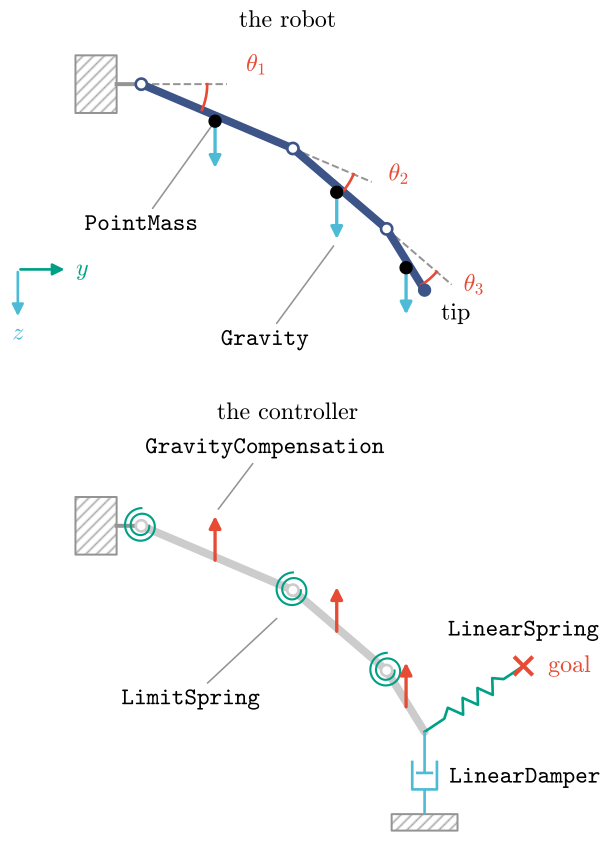
The robot mechanism describes the hardware. Its kinematics give the coordinates, here the joint angles \(\theta_1\) to \(\theta_3\) and any point such as the tip. Its motors drive them. Its components are physical: the masses of the phalanges, gravity and, on a soft robot, its own stiffness and damping.
The controller is a virtual mechanism on the same coordinates. Here a spring pulls the tip to a goal, a damper slows the tip, spiral springs keep each joint in its range and gravity compensation cancels the weight of the phalanges. A controller can also have degrees of freedom of its own, its virtual states.
The two never mix. A simulator moves the robot mechanism with its own components. The controller’s torques come from the controller’s components alone, through the robot’s kinematics and motors. On the real robot, the hardware takes the place of the simulator.
Four steps
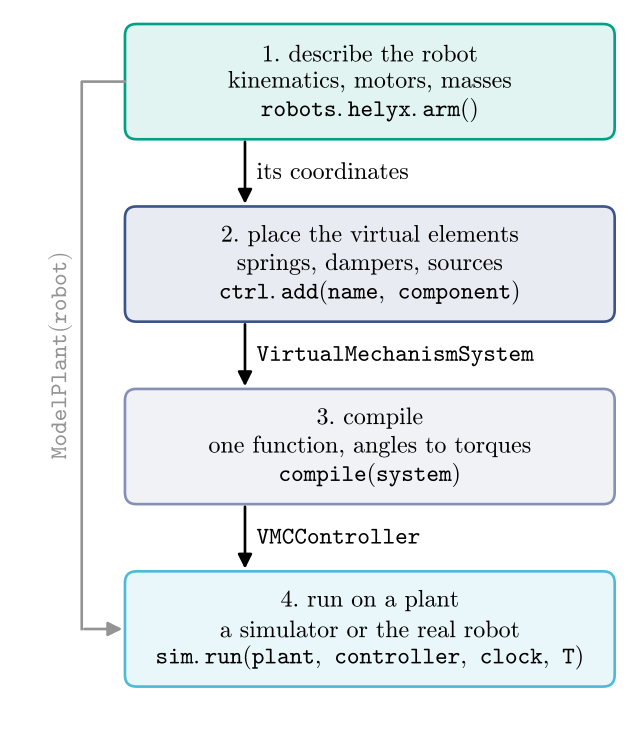
Describe the robot: a ready-made template from
virtualmodelcontrol.robots, or a model of our own.Place the virtual elements: components on the robot’s coordinates, in a
vmc.Mechanism.Compile:
vmc.compileturns the two mechanisms into one CasADi function (CasADi is the library that builds and differentiates such functions) from motor angles and rates to motor torques, with exact derivatives.Run on a plant:
vmc.VMCControllerevaluates that function at every control step. The plant is a simulator built from the robot mechanism alone (vmc.sim.ModelPlant), or the real robot.
Where to go next
Your first controller runs the four steps on the soft arm.
Coordinates lists where we can attach, and Components what.
Parameters shows which numbers can change while the robot runs.
Energy and passivity follows the energy through a run.
Build a robot describes a robot of our own.
Virtual Model Control and Passivity give the equations behind these steps.
How the library is organized maps the packages, and the glossary defines the terms.